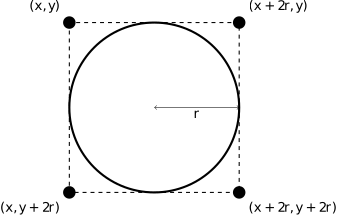
GOval object located at point (x,y) with radius r.
Now comes the interesting part. In order to make Breakout into a real game, you have to be able to tell whether the ball is colliding with another object in the window. As scientists often do, it helps to begin by making a simplifying assumption and then relaxing that assumption later. Suppose the ball were a single point rather than a circle. In that case, how could you tell whether it had collided with another object?
If you review the methods that are available for the GWindow class, you will be reminded that there is a method get_element_at(x,y) that takes a location in the window and returns the graphical object at that location, if any. If there are no graphical objects that cover that position, get_element_at returns the constant None. If there is more than one, get_element_at always chooses the one closest to the top of the stacking order, which is the one that appears to be in front of the display.
So far, so good. In reality, however, the ball is not a single point, which means that its boundary may collide with something even thought its center does not. The easiest thing to do–which is in fact typical of the simplifying assumption made in real computer games–is to check the corner points of the square that encloses the ball. Remember that a GOval is defined in terms of its bounding rectangle, so that if the upper left corner of the ball is at the point (x,y), the other corners will be at the locations shown in Figure 1.
GOval object located at point (x,y) with radius r.
These points have the added advantage of being outside the ball itself–which means that get_element_at won’t return the ball–but nonetheless close enough to make it appear that collisions have occurred. Thus, for each of these four points, you need to:
get_element_at on that location to see whether anything is there.None, then you need to look no further as you have found a colliding object and can take that returned object as the GObject with which the collision occurred.get_element_at returns None for a particular corner, go on and try the next corner.It can be useful to decompose this part of the program into a separate function called get_colliding_object, which internally checks all four (if necessary) corners of the ball and returns the GObject colliding with the ball (if any), or None otherwise. You can then use it in a statement like
collider = get_colliding_object()which assigns the colliding GObject to a variable called collider.
From here, the only remaining thing you need to do is decide what to do when a collision occurs. There are only two possibilities. First, the object you get back might be the paddle, which you can test simply by checking whether collider is equal to the GObject for the paddle, which you’ve presumably stored in a local variable as part of Milestone 2.
If the colliding object is the paddle, you need to bounce the ball so that it starts traveling up. If it isn’t the paddle, the only other thing it might be is a brick, since those are the only other objects in the world. Once again, you need to cause a bounce in the vertical direction, but you also need to take the brick away. To do so, all you need to do is remove it from the screen by calling the remove method on the GWindow object that the ball collided with (which, if you followed the above advice, would be the object assigned to the variable collider).