Overview of the data files
Like the teaching machine program, the Adventure program you create for this project is entirely data driven. The program itself does not know the details of the game geography, the items that are distributed across the various rooms, or even the words used to move from place to place. All such information is supplied in the form of data files, which the program uses to control its own operation. If you run the program with different data files, the same program will guide its players through different sets of rooms that presumably have different interconnections, items, and puzzles.
The starting repository includes data files for three different adventures of varying sizes. The smallest of these is the Tiny adventure, which describes an adventure with four rooms and no items. The largest is the Crowther adventure, which includes a relatively sizable subset of Will Crowther’s original Adventure game. In between those extremes is the Small adventure, which includes examples of the main features in the game in a space containing just 12 rooms. You should use the Tiny adventure until you get to Milestone 4. After that, you should use the Small adventure whenever you are debugging. Once you have got things working, you can move on to the Crowther adventure.
To indicate which data files you would like to use, the Adventure.py program defines a constant called DATA_FILE_PREFIX, which identifies the string that appears at the beginning of the filenames used for that adventure. To get the adventure game illustrated in the earlier examples in this section, DATA_FILE_PREFIX is set to "Crowther", which selects the collection of files associated with a large chunk of Will Crowther’s original Adventure game. For each adventure, there are three associated data files that contain the name of the adventure as a prefix. For the Crowther adventure, for example, these files are:
CrowtherRooms.txt, which defines the rooms and the connections between them. In these examples, you have visited three rooms: outside of the building, the top of the hill, and the inside of the well house.CrowtherItems.txt, which specifies the descriptions and initial locations of the items in the game, such as the set of keys.CrowtherSynonyms.txt, which defines several words as synonyms of other words so that you can use the game more easily. For example, the compass pointsN,S,E, andWare defined to be equivalent toNORTH,SOUTH,EASTandWEST. Similarly, if it makes sense to refer to an item by more than one word, this file can define the two as synonyms. As you explore the Crowther cave, for example, you will encounter a gold nugget, and it makes sense to allow players to refer to it using eitherGOLDorNUGGET.
These data files are not Python programs, but are instead text files that describe the structure of a particular adventure game in a form that is easy for game designers to write. The Adventure program reads these files into an internal data structure, which it then uses to guide the player through the game.
The Rooms file
The Rooms file contains the names and descriptions of the rooms along with the passages that connect them. The contents of TinyRooms.txt, for example, are shown below in Figure 1.
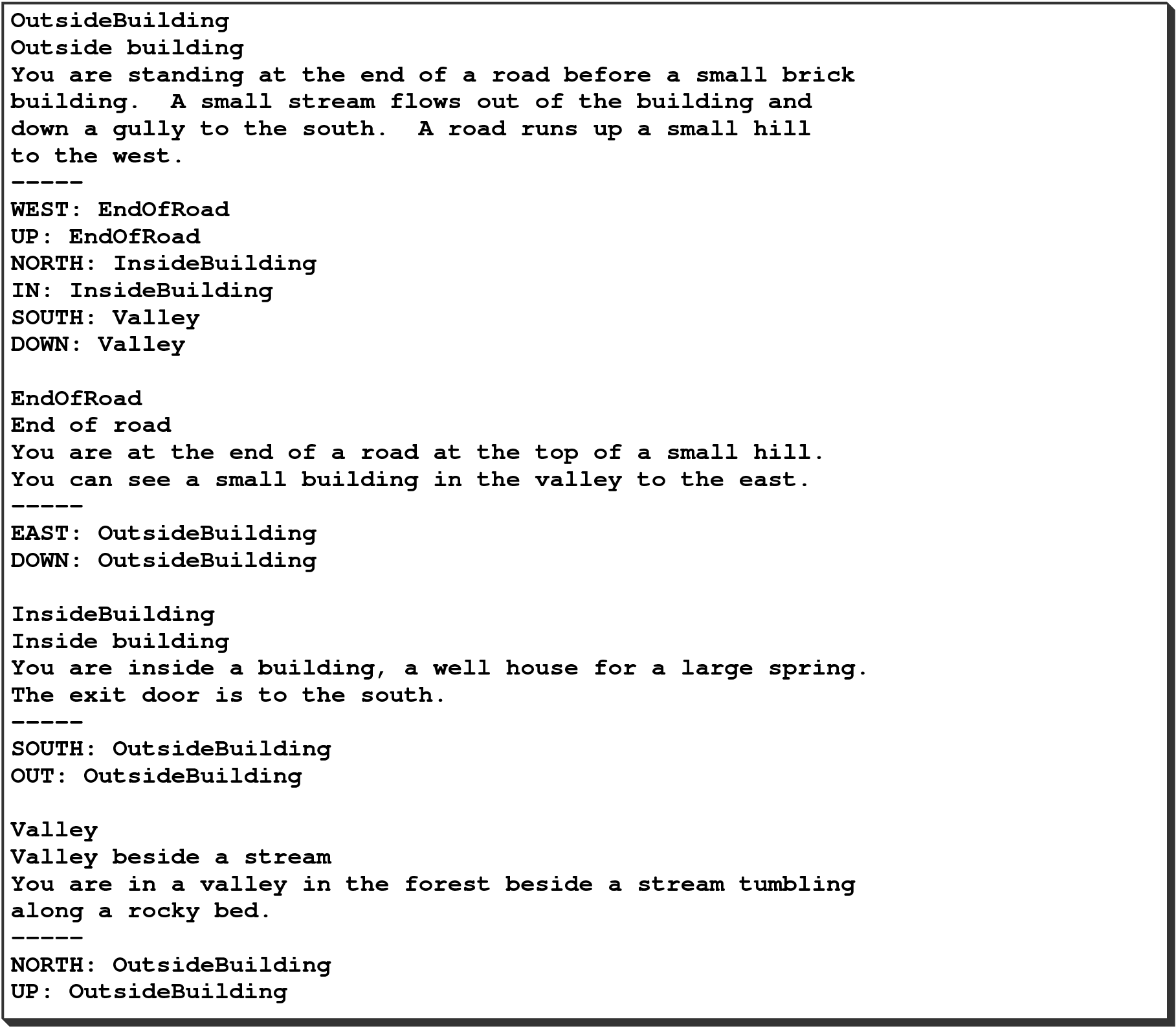
TinyRooms.py text file, which contains the details about what rooms exist in the adventure and how they are connected to one another.
The first thing to notice about the TinyRooms.txt data file is that it matches almost exactly the format used for the teaching machine application. The only real difference is that each room includes a one-line short description as well as the multi-line text. When you implement the code to read the data file for the rooms, you will have to make a few small changes to accommodate this difference. The more substantial part of revising the implementation, however, lies in making sure that the names of all the variables and methods match the metaphor of the Adventure game and not the teaching machine. It would certainly confuse anyone looking at your code to see names like questions and answers! In the context of the Adventure game, the code needs to refer to rooms and passages instead.
The Items file
Although you will not need to think about this file until you get to Milestone 4, both the Small and Crowther adventures define a set of items that are distributed somewhere in the cave, such as the keys you saw in the earlier example. Like the rooms, the items in the game are specified using a data file, such as the one for the Small adventure shown in Figure 2.
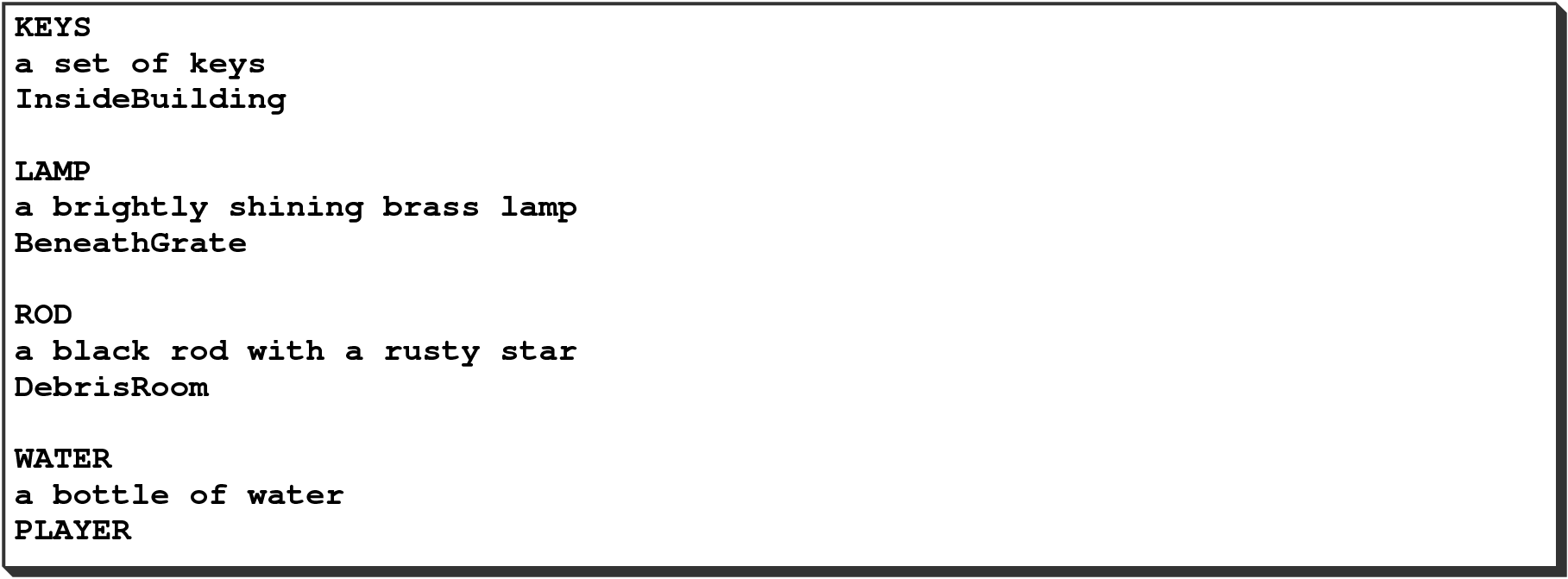
SmallItems.txt data file, which contains information about the available items that can appear in the rooms and where they would initially appear.
The contents of the Items file consist of a series of three-line entries, one for each item. The first line is the name of the item, which is also the word that the player uses to refer to the item. The second is a short description of the item, usually beginning with an article like a or an. The third is the name of the room in which the item is placed at the beginning of the game. For example, the lines
KEYS
a set of keys
InsideBuilding
define an item whose name is "KEYS" and whose description is "a set of keys". At the beginning of the game, that item is placed in the room whose identifying name is "InsideBuilding", which is precisely where you saw it in the sample runs shown in the earlier section.
The last entry in the SmallItems.txt data file illustrates a feature than requires special handling. The lines
WATER
a bottle of water
PLAYER
specify that the bottle of water starts off in the player’s possession. You will have to check for this case in the code that distributes the items, starting in Milestone 3.
The Synonyms file
The last data file is the Synonyms file, which consists of a sequence of definitions that allow the player to use more than one word to refer to a direction or an item. The SmallSynonyms.txt file in Figure 3, for example, defines BOTTLE as a synonym for WATER, since both nouns appear in the description. It also defines abbreviated forms of the standard directions so that the player can type N instead of NORTH, along with a few equivalent words for verbs like TAKE and DROP.
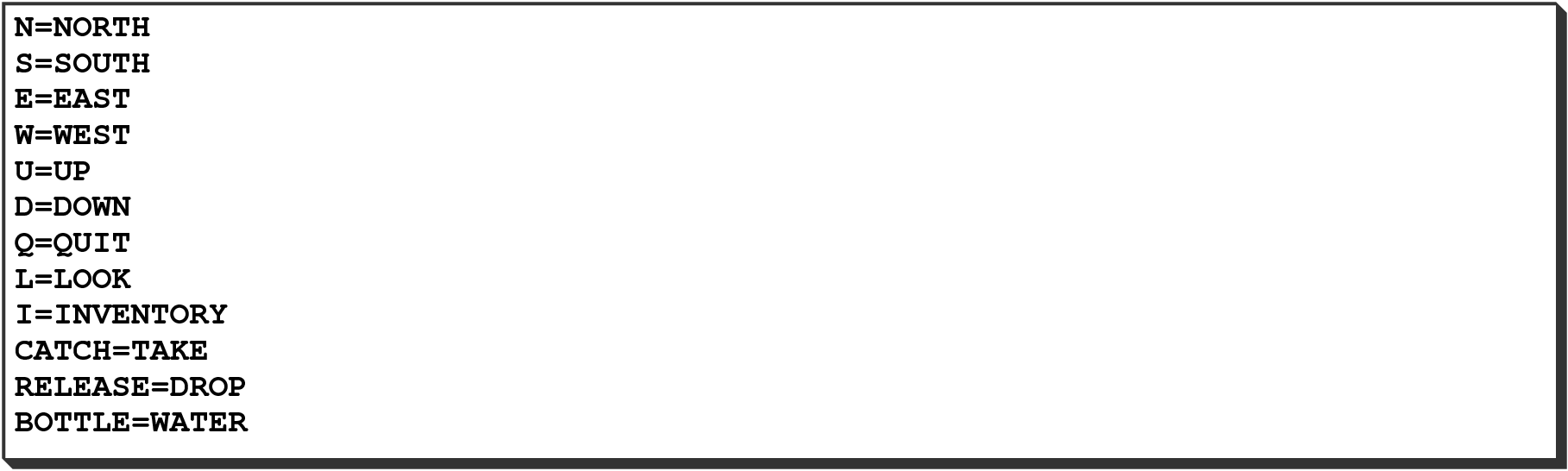
SmallSynonyms.txt data file, which includes alternative commands or item labels that can be used within the game.