Geometries and Geographies
Jed Rembold
Monday, November 11, 2024
Announcements
- Homework 9 due on Thursday
- Only 1 more hw assignment past this one!
- I tried to get the exams fully graded, but I’m in the middle of the
last problem. Sorry :(
- For sure they will be back to you Wednesday
- I’ll send out another grade report this weekend with latest scores factored in
- We’ll talk about projects on Wednesday
- Poll sent out yesterday asking for your preferences
- If you haven’t filled it out, fill it out now! If you have submitted nothing by the time I am making pairs tomorrow, then I’ll assume you have no preferences.
- Polling today: polling.jedrembold.prof
Review Question
What would the output of the below query look like?
SELECT regexp_split_to_table(
  '01-13-2021, 04-24-2022', '[,-]\s*') AS rev;
rev 01 13 2021 04 24 2022 rev 01-13-2021 04-24-2022 rev 01 13 2021, 04 24 2022 rev 01 13 2021 “” 04 24 2022
Lexeme Activity
Your Turn!
The file here contains the
SQL commands to generate and populate a simple table
alice which hold the raw chapter contents of
the book: Alice in Wonderland. You will need to set up your own
tsvector column and index. With your
neighbors, see if you can use the data to answer the following:
- In what chapters does the “Cheshire cat” appear?
- In what chapter does the term “mushroom” appear the most? How many times does it appear?
Space: The Final Frontier
Positional Data
- Location information can be a fundamental aspect of stored data
- Currently, we could store such data, but Postgres has no intelligent methods of working with or analyzing that data
- We’ll focus the next few days on how we can utilize Postgres’s PostGIS extension to unlock the power of location based data
- Don’t overlook the official PostGIS documentation, which can be a helpful resource to accompany these slides and the text
PostGIS
Unlike the
tablefuncextension,PostGISdoes not generally come with plain Postgres by default- On Windows and Mac however, if you installed Postgres as indicated at the start of the semester, you should already have it on your system
- If you are missing it in Windows, you can launch the Stack Builder and should be able to add the extension from there
The PostGIS extension will bring in a lot of extra functions and data types, so you might consider creating a new database to contain GIS type data (maybe
analysis_gis)Adding the extension to the database is the same as with other extensions:
CREATE EXTENSION postgis;
Geometries
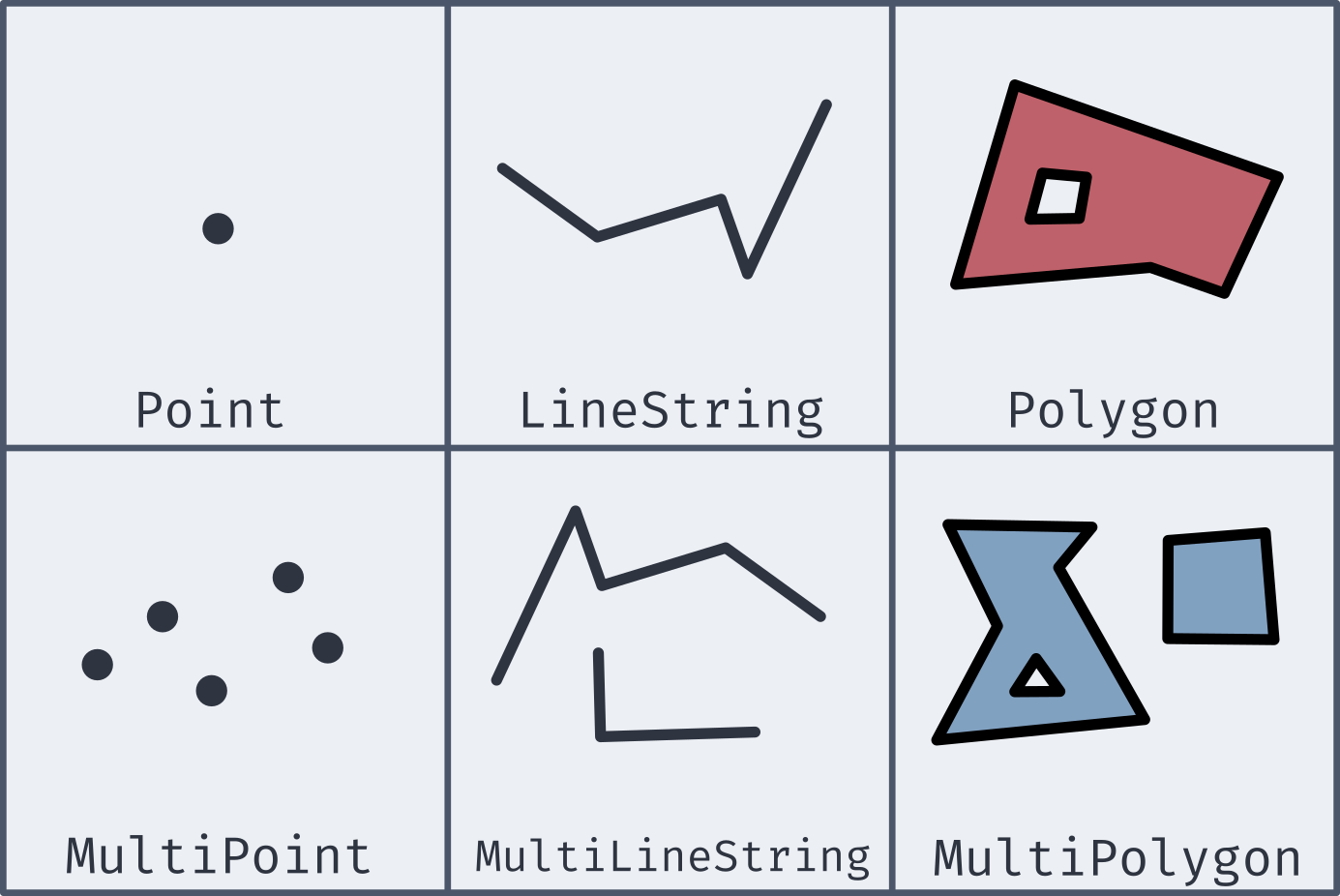
Well-Known Text
- Most of the new geometries will be constructed by passing in a well-known text string (or WKT)
| Type | Format | Comments |
|---|---|---|
Point |
'POINT (-74.9 42.7)' |
No comma separating, and longitude comes first! |
LineString |
'LINESTRING (-74.9 42.7, -75.1 42.7)' |
Comma separates coordinate pairs |
Polygon |
'POLYGON((74 42, 75 42, 76 43, 74 42))' |
Double parentheses, initial point repeated to close |
MultiPoint |
'MULTIPOINT(75 42, 74 43)' |
Comma separates coordinate pairs |
MultiLineString |
'MULTILINESTRING((76 43, 77 43), (78 43, 77 43))' |
Parentheses group individual lines |
MultiPolygon |
'MULTIPOLYGON(((74 43, 75 44, 74 45, 74 43), (81 40, 81 39, 82 39, 81 40)))' |
Still double parentheses to start and end, with 3rd parentheses grouping polygons |
Coordinate Systems
- To be able to relate and compare locations to one another, a
consistent coordinate system needs to be used
- This covers everything from the mapping projection to whether or not you are working in curved space
- PostGIS (and most GIS applications) let you specify the coordinate system with a Spatial Reference System Identifier, or SRID
- Most commonly used for us will be the most recent World Geodetic
System: WGS 84
- This corresponds to an SRID of 4326
- If grabbing geospatial data from an online source, always check its coordinate system
- All coordinate system information stored in
spatial_ref_systable, so you can query to find necessary SRIDs
New Data Types
- While PostGIS introduces many new spatial geometries, only a few new data types are added to Postgres.
geography- Based on spherical curvature, all calculations take place on a globe
- More complicated math means fewer functions work, but distances are more precise, especially over large spans
- Results expressed in meters
geometry- Based on a flat map, where all calculations take place on a plane (the mathematical sort)
- Math is simpler, but distances are less precise if across large spans
- Results expressed in units dependent on chosen coordinate system
- Both types can hold all of the spatial geometries mentioned earlier
Creating Spatial Types
Two main methods of creating geography or geometry types:
ST_GeomFromText(WKT, SRID)creates a geometry object to hold the spatial object given by the WKT with the optional given SRID- If no SRID is given, it is assumed to be 0 (no SRID at all)
ST_GeogFromText(WKT, SRID)creates a geography object to hold the spatial object given by the WKT with the optional given SRID- If no SRID is given, WGS 84 (SRID 4326) is the assumed default
If you look at the output of one of these data types, it is not human-readable
SELECT ST_GeogFromText('POINT(-75 42)');
>> 0101000020E61000000000000000C052C00000000000004540
SELECT ST_GeomFromText('POINT(-75 42)', 4326);
Making Spatial Objects
- Using a WKT to create spatial objects can be clunky if you already have latitude and longitude values in your table as numbers
- PostGIS offers a number of constructor functions for various objects
that return geometry data types with no inherent SRID
ST_MakePoint(|||long|||, |||lat|||, [|||z|||,|||m|||])will create a geometric point with optional 3rd or 4th dimensions as wellST_MakeLine(|||point1|||, |||point2|||)will create a line from the first point to the second. There is an array option as well.ST_MakePolygon(|||geometry_linestring|||, [|||cutout_linestring|||])will create a geometric polygon using the provided linestring with optional cutouts- These can have an SRID attached to them and be cast to geography
data types as desired
ST_SetSRID(|||object|||, |||SRID|||)will attach the given SRID metadata to the object
Adding an Index
- B-Trees are not well suited for indexing coordinate information
- Which would be “bigger”: (2,0) or (0,2)?
- Instead, PostGIS recommends using the Generalized Search Tree (GiST) index type
CREATE INDEX |||index_name|||
ON |||table|||
USING GIST (|||column|||);
Actual Analysis!
- Now that we’ve gone to all this effort to get the spatial data into a format that Postgres can understand, we can actually do some analysis!
- Two of the most common functions deal with distances:
ST_DWithin(|||point1|||, |||point2|||, |||distance|||)returns a True or False depending on whether the two points are within the given distance from one another- Remember that geography distances are in meters, whereas geometry distance units depend on the SRID
ST_Distance(|||point1|||, |||point2|||)computes the distance between the two points- This will be along a curve in geography, or on the flat plane in geometry
Your Turn!
- In the following groups, import in the data here, which is a collection
of the small liberal art NW colleges along with their latitude and
longitudes. See if you can add a new column with the necessary data
type, add an index, and then answer the following questions:
- What other schools are within 100km of Willamette?
- What two schools are the closest together?
Today’s Groups
- Group 1: Aurora, Jerrick, Jack
- Group 2: Harleen, AJ, Sergio
- Group 3: Mallory, Evan, Matthew
- Group 4: Marcus, Connor
- Group 5: Tippy, Nick, Jordan
- Group 6: Greg, Sam H, Grace
- Group 7: Dayton, Haley, Sam J
- Group 8: Michael, Hannah, Tiffany